









Hi wonderful community! 
Making friends is one of the most important aspect of this community. Even if you live miles away, there are other special brides/grooms who are going through the same process as you are. We are all here to offer our virtual support to one another.
Here's a short guide on how to make friends in the community.
1. Participate in discussions.
Have a look at the discussions in the community and participate by commenting in the discussions you find interesting! That way, you'll find other people with similar interests, tastes, venues and can exchange ideas.
2. Create discussions
Bring your ideas to the table! These can be...
- Questions
Ask your questions to the community to get relevant answers from brides who know what you're going through. And when someone will have the answer to your question, you'll be like...

- Inspiration
Where do you find the best ideas? Share what you find to inspire other brides like you!

- Your moment
Wedding preperations can be super exciting or super stressful at times. When you want to share these moments, we'll be here to listen, share your happiness, or


- Funny
Just laugh about it. Share funny things you come across that are wedding related, it's a wonderful way to release stress and enjoy the moment!

3. Reply to other discussions
Participate in other brides or grooms discussions. Offer your support, comment on what they found, react to their discussions, give your feedback, get back to people, ... be a good friend! 

4. Add friends to your WeddingWire network.
- Go to one's profile by clicking on their profile picture.
- Click the button "Add Friend"

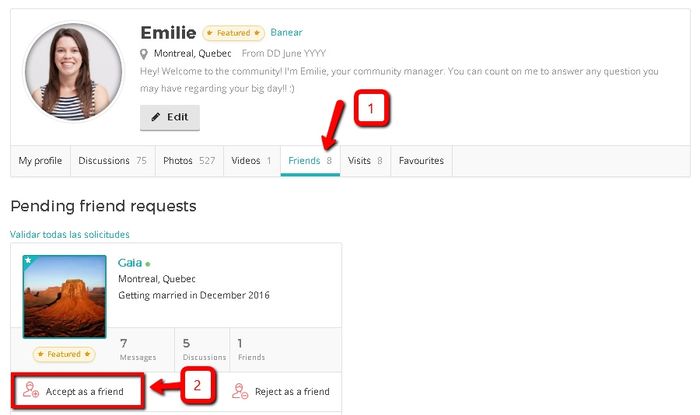
5. Accept friend requests
Go to your profile to see if you have any pending friend request.
1 - Click on the "Friends" tab.
2 - Click Accept or Reject on the friend request.
****
Images:
Giphy.com
Memes.com